


(2026) PASS SC-300 Exam Free Practice Test with 100% Accurate Answers
SC-300 dumps Free Test Engine Verified By It Certified Experts
NEW QUESTION # 204
Hotspot Question
You have a Microsoft 365 E5 subscription that has a Conditional Access policy named Policy1.
You need to perform the following actions:
- Create a Conditional Access App Control custom policy named Custom1.
- Configure Policy1 to use Custom1.
What should you use to create Custom1, and in which settings of Policy1 should you enable Conditional Access App Control? To answer, select the appropriate options in the answer area, NOTE: Each correct selection is worth one point.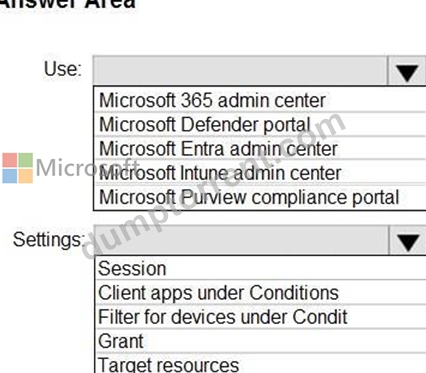
Answer:
Explanation: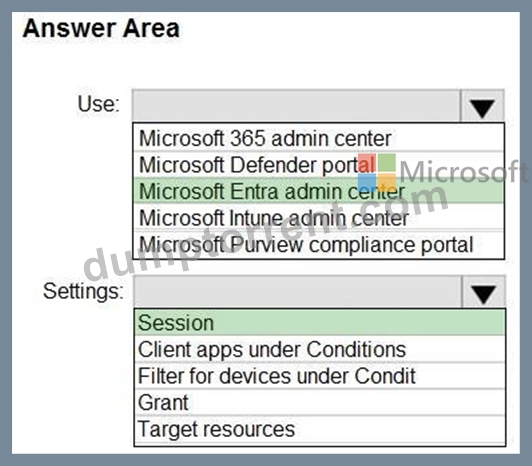
Explanation:
Box 1: Microsoft Entra admin center
The "Conditional Access App Control" custom policy is created within the Microsoft Entra admin center. Specifically, you'll find it under Protection > Conditional Access > Policies. You can also access it through Entra ID > Conditional Access.
Box 2: Session
Define Session controls:
Under the "Session" section, you can enable Conditional Access App Control. This allows you to leverage Microsoft Defender for Cloud Apps for session controls and custom policies.
Reference:
https://learn.microsoft.com/en-us/defender-cloud-apps/proxy-intro-aad
NEW QUESTION # 205
You have an Azure subscription that contains the resources shown in the following table.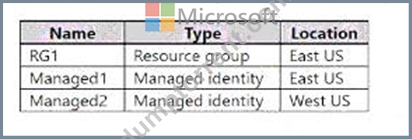
The subscription contains the virtual machines shown in the following table.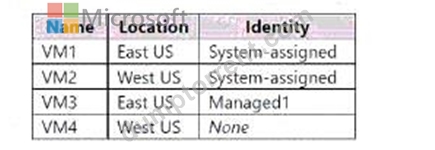
Which identities can be assigned the Owner role for RG1, and to which virtual machines can you assign Managed2? To answer, select the appropriate options in the answer area NOTE: Each correct selection is worth one point.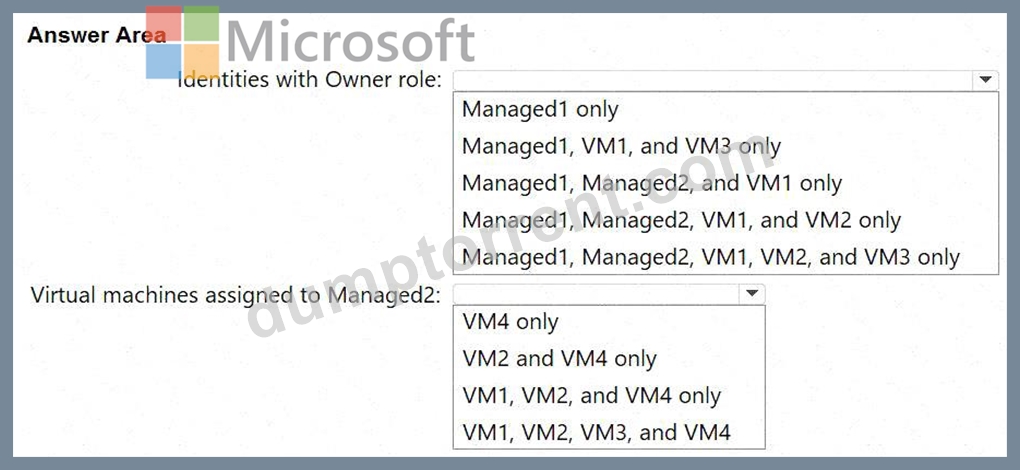
Answer:
Explanation: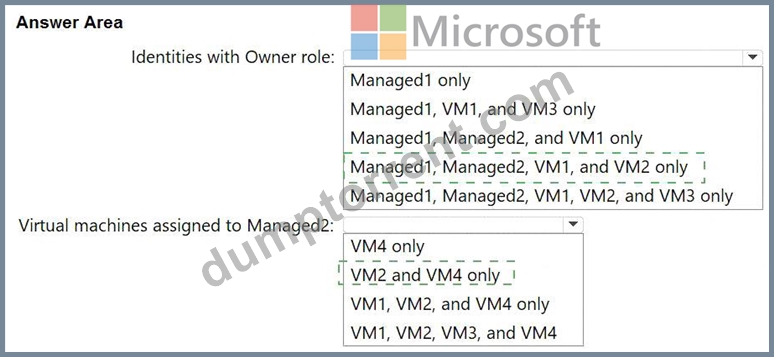
Explanation:
Identities with Owner role: Managed1, Managed2, VM1, and VM2 only
Virtual machines assigned to Managed2: VM2 and VM4 only
In Azure RBAC, role assignments can be made to Azure AD security principals, including managed identities (user-assigned and system-assigned). The SC-300 learning path on Identity Governance and Privileged Access, and the Exam Ref coverage of Azure RBAC, explain that a system-assigned managed identity is a service principal tied to a single resource, and you can assign RBAC at any scope (subscription, resource group, or resource) to that identity. A user-assigned managed identity is an independent Azure resource with its own service principal; it can also be granted roles at the resource group scope. Therefore, the assignable principals for RG1 include the two user-assigned identities (Managed1, Managed2) and the two VMs that have system-assigned identities (VM1, VM2). VM3 does not present a system-assigned identity; its access is represented by Managed1.
For attaching a user-assigned identity to a virtual machine, SC-300 materials note that the identity and the target resource must be in the same region (often phrased as "user-assigned identities are regional; the identity and the resource must share a region"). Since Managed2 is in West US, it can be associated only with West US VMs-here, VM2 and VM4.
NEW QUESTION # 206
You have an Azure subscription that contains the custom roles shown in the following table.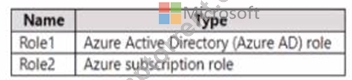
You need to create a custom Azure subscription role named Role3 by using the Azure portal. Role3 will use the baseline permissions of an existing role. Which roles can you clone to create Role3?
- A. built-in Azure subscription roles only
- B. Role2 only
- C. built-in Azure subscription roles and built-in Azure AD roles only
- D. built-in Azure subscription roles and Role2 only
- E. Role1, Role2 built-in Azure subscription roles, and built-in Azure AD roles
Answer: D
NEW QUESTION # 207
You have an Azure Active Directory (Azure AD) tenant that has an Azure Active Directory Premium Plan 2 license. The tenant contains the users shown in the following table.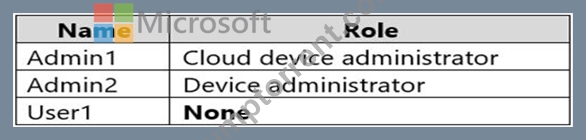
You have the Device Settings shown in the following exhibit.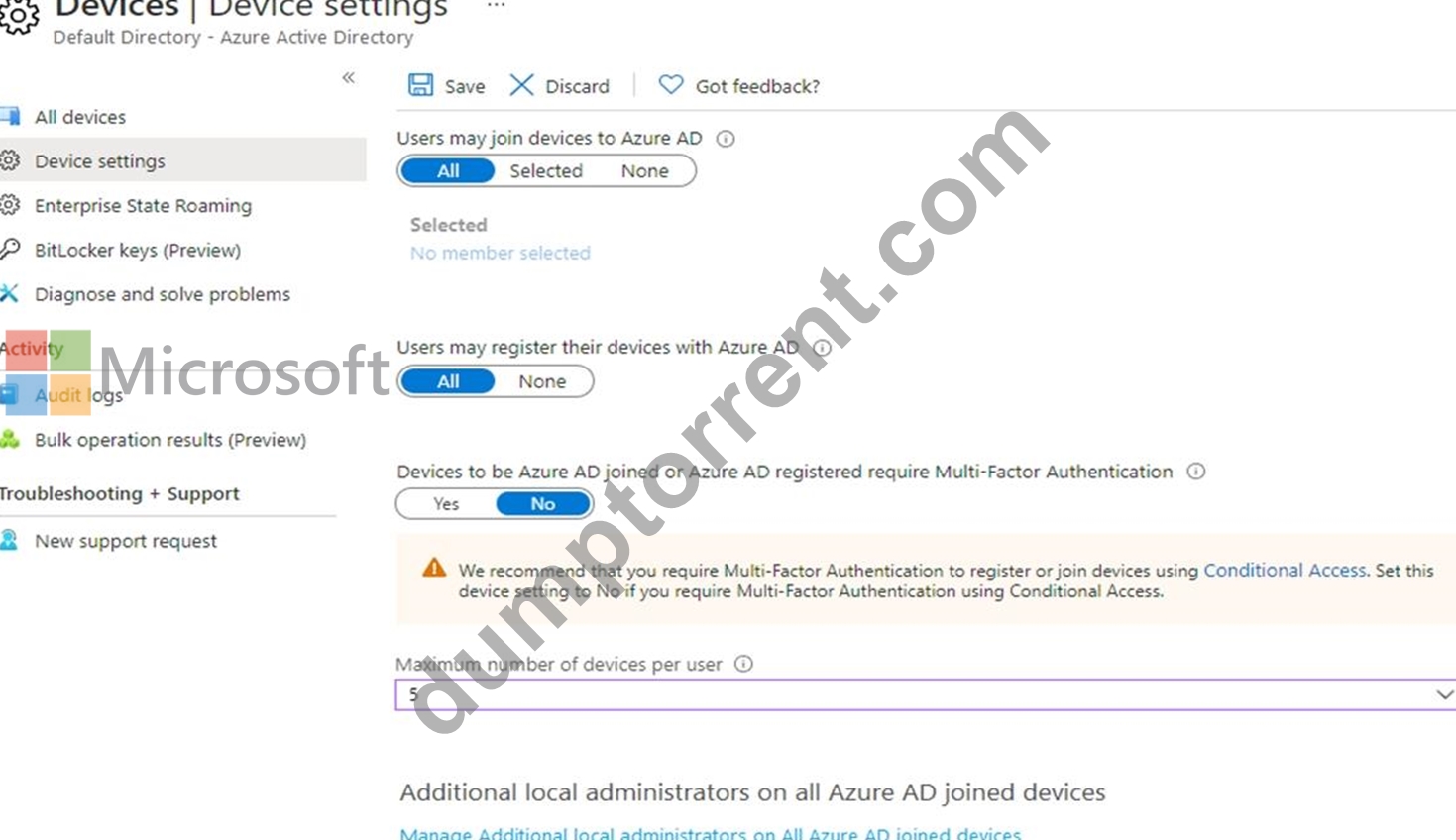
User1 has the devices shown in the following table.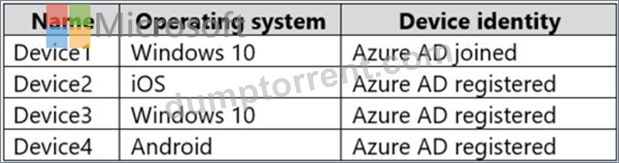
For each of the following statements, select Yes if the statement is true. Otherwise, select No.
NOTE:Each correct selection is worth one point.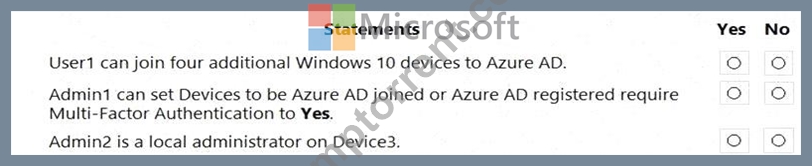
Answer:
Explanation: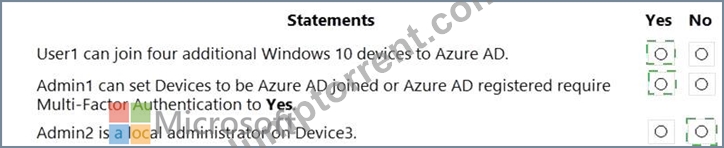
Explanation:
Box 1: Yes
Users may join 5 devices to Azure AD.
Box 2: Yes
Box 3: No
An additional local device administrator has not been applied
Reference:
https://docs.microsoft.com/en-us/azure/active-directory/devices/device-management-azure-portal
NEW QUESTION # 208
You configure a new Microsoft 36S tenant to use a default domain name of contosso.com.
You need to ensure that you can control access to Microsoft 365 resource-, by using conditional access policy.
What should you do first?
- A. Disable Security defaults.
- B. Disable the User consent settings.
- C. Configure password protection for Windows Server Active Directory.
- D. Configure a multi-factor authentication (Ml A) registration policy1.
Answer: A
Explanation:
According to the Microsoft SC-300: Microsoft Identity and Access Administrator Study Guide and Microsoft Learn module "Plan and implement Conditional Access policies", enabling or customizing Conditional Access policies requires that Security Defaults in Azure AD be disabled.
Security defaults provide a basic level of protection, such as enforcing MFA for all users and blocking legacy authentication. However, when Security Defaults are enabled, custom Conditional Access policies cannot be created because both features manage sign-in risk and access control.
From the Microsoft documentation:
"To use Conditional Access policies, you must disable security defaults. Conditional Access policies provide more granularity and flexibility than security defaults." Therefore, before you can control access to Microsoft 365 resources through Conditional Access, the first step is to disable Security Defaults in the Azure AD tenant.
NEW QUESTION # 209
You have an Azure Active Directory (Azure AD) tenant named contoso.com that contains a user named User1.
User1 has the devices shown in the following table.
On November 5, 2020, you create and enforce terms of use in contoso.com that has the following settings:
Name: Terms1
Display name: Contoso terms of use
Require users to expand the terms of use: On
Require users to consent on every device: On
Expire consents: On
Expire starting on: December 10, 2020
Frequency: Monthly
On November 15, 2020, User1 accepts Terms1 on Device3.
For each of the following statements, select Yes if the statement is true. Otherwise, select No.
NOTE: Each correct selection is worth one point.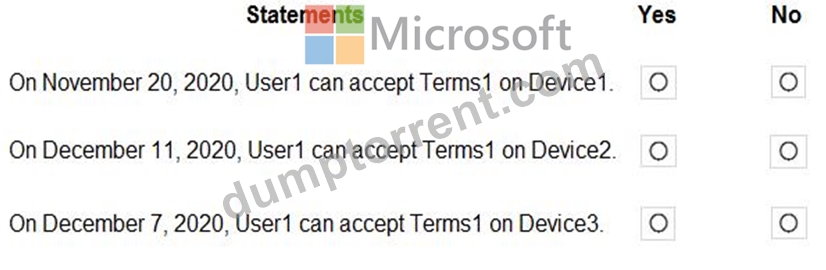
Answer:
Explanation: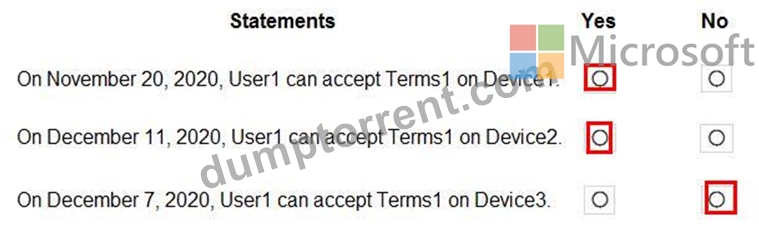
NEW QUESTION # 210
You have an Azure subscription that is linked to a Microsoft Entra tenant named contoso.com. The subscription contains a group named Group1 and a virtual machine named VM1.
You need to meet the following requirements:
* Enable a system-assigned managed identity for VM1.
* AddVM1 to Group1.
How should you complete the PowerShell script? To answer, drag the appropriate cmdlets to the correct targets. Each cmdlet may be used once, more than once, or not at all. You may need to drag the split bar between panes or scroll to view content.
NOTE: Each correct selection is worth one point.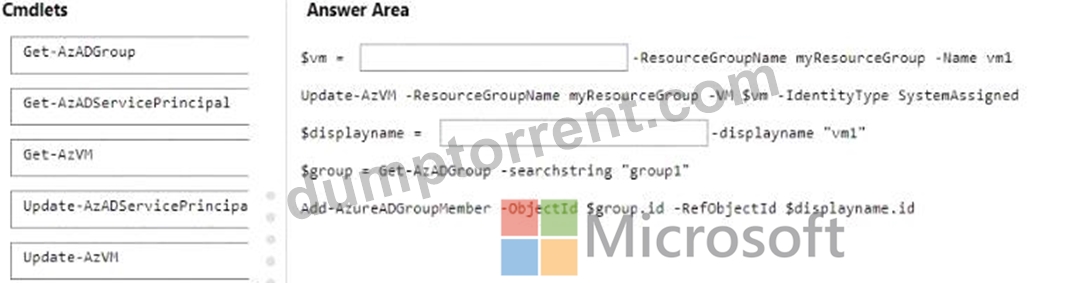
Answer:
Explanation: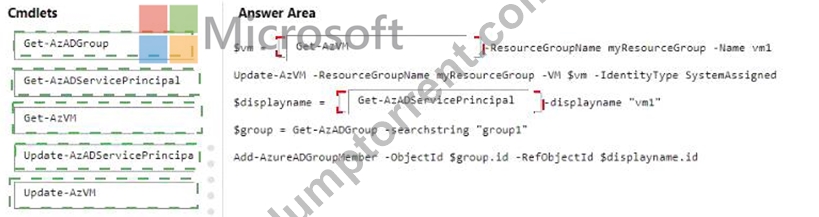
Explanation: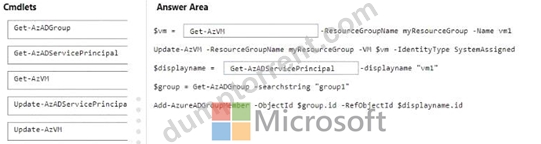
NEW QUESTION # 211
You have an Azure Active Directory Premium P2 tenant.
You create a Log Analytics workspace.
You need to ensure that you can view Azure Active Directory (Azure AD) audit log information by using Azure Monitor.
What should you do first?
- A. Modify the Diagnostics settings for Azure AD.
- B. Run the Get-AzureADAuditDirectoryLogs cmdlet.
- C. Create an Azure AD workbook.
- D. Run the Set-AzureADTenantDetail cmdlet.
Answer: B
Explanation:
Reference:
https://docs.microsoft.com/en-us/azure/active-directory/reports-monitoring/howto-integrate-activity-logs-with-lo
NEW QUESTION # 212
You have an AzureAD tenant that contains the users shown in the following table.
You have the locations shown in the following table.
The tenantcontainsa named location that Das the following configurations:
* Name: location1
* Mark as trusted location: Enabled
* IPv4 range: 10.10.0.0/16
MFA has a trusted iPad dress range of 193.17.17.0/24.
You have a Conditional Access policy that has the following settings:
* Name: CAPolicy1
* Assignments
o Users or workload identities: Group 1
o Cloud apps or actions: All cloud apps
* Conditions
* Locations All trusted locations
* Access controls
o Gant
* Grant access: Require multi-factor authentication
* Session: 0 controls selected
* Enable policy: On
For each of the following statements select Yes if the statement is true. Otherwise, select No. NOTE: Each correct selection is worth one point.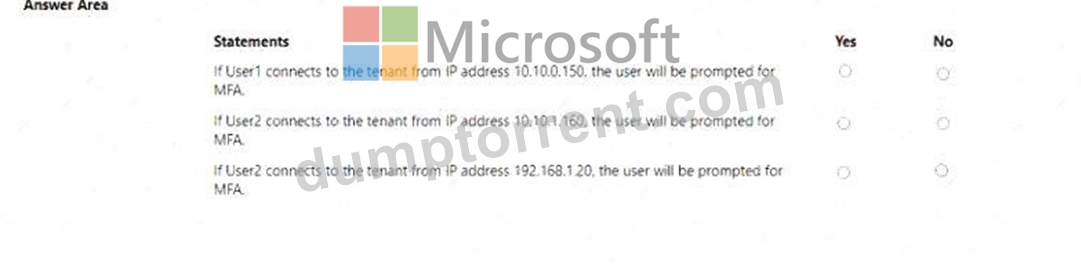
Answer:
Explanation: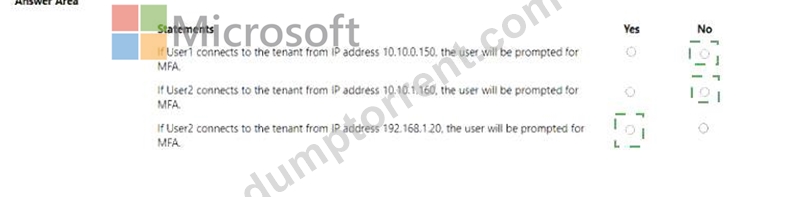
Explanation: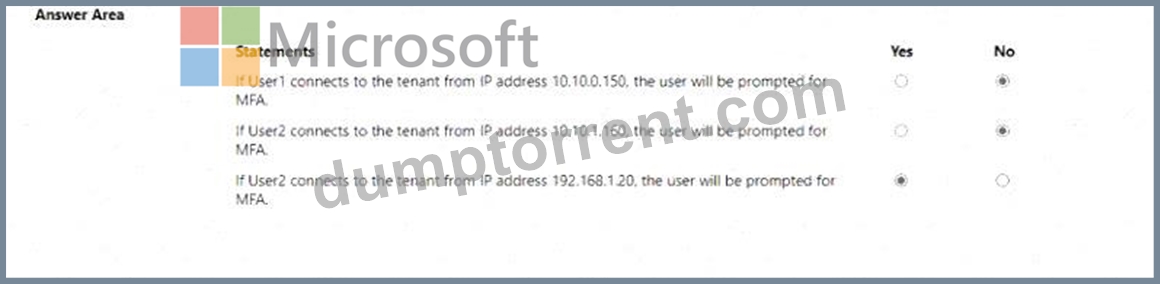
NEW QUESTION # 213
You have a Microsoft 365 E5 subscription that uses Microsoft Defender for Cloud Apps.
You need to identify which users access Facebook from their devices and browsers. The solution must minimize administrative effort.
What should you do first?
- A. Create a Defender for Cloud Apps access policy.
- B. Create an app configuration policy in Microsoft Endpoint Manager.
- C. From the Microsoft Defender for Cloud Apps portal, unsanctioned Facebook.
- D. Create a Conditional Access policy.
Answer: C
NEW QUESTION # 214
You have an Azure AD tenant that contains the users shown in the following table.
In Azure AD Identity Protection, you configure a user risk policy that has the following settings:
* Assignments:
o Users: Group1
o User risk: Low and above
* Controls:
o Access: Block access
* Enforce policy: On
In Azure AD Identity Protection, you configure a sign-in risk policy that has the following settings:
* Assignments:
o Users: Group2
o Sign-in risk: Low and above
* Controls:
o Access: Require multi-factor authentication
* Enforce policy. On
the following settings:
ng settings:
For each of the following statements, select Yes if the statement is true. Otherwise, select No.
NOTE: Each correct selection is worth one point.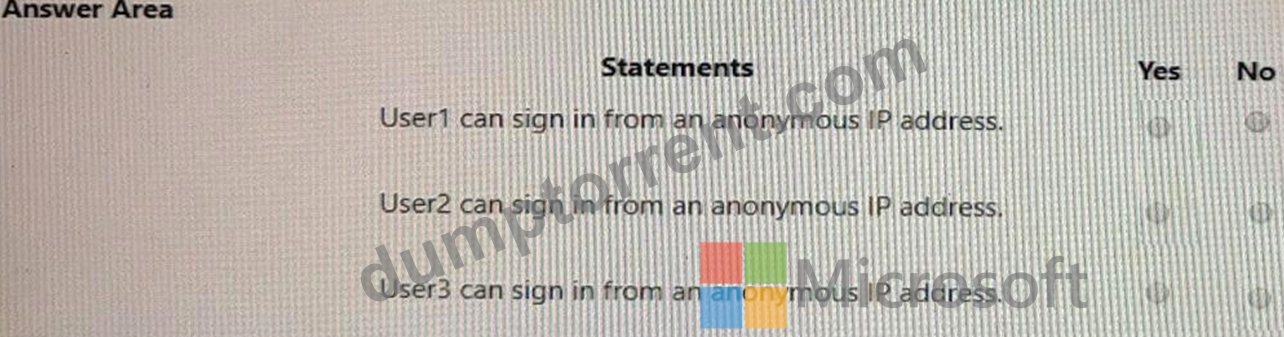
Answer:
Explanation: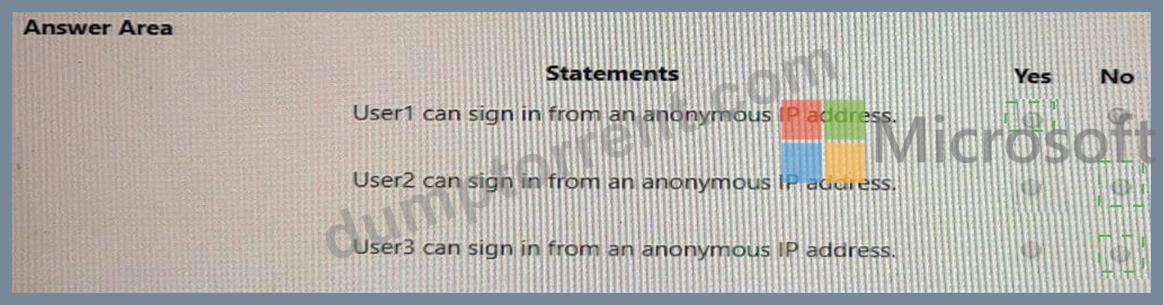
Explanation: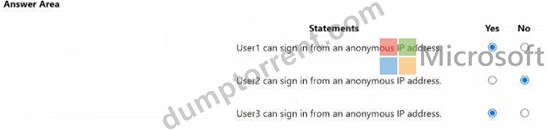
NEW QUESTION # 215
A user named User1 attempts to sign in to the tenant by entering the following incorrect passwords:
* Pa55w0rd12
* Pa55w0rd12
* Pa55w0rd12
* Pa55w.rd12
* Pa55w.rd123
* Pa55w.rd123
* Pa55w.rd123
* Pa55word12
* Pa55word12
* Pa55word12
* Pa55w.rd12
You need to identify how many sign-in attempts were tracked for User1, and how User1 can unlock her account before the 300-second lockout duration expires.
What should identify? To answer, select the appropriate
NOTE: Each correct selection is worth one point.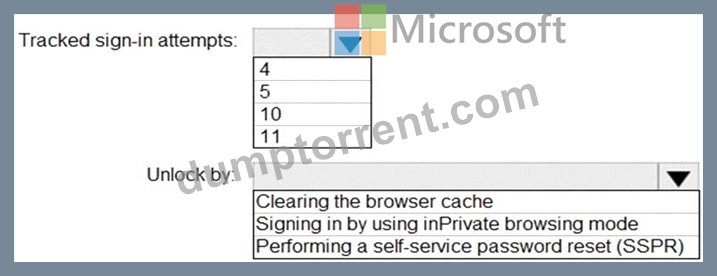
Answer:
Explanation: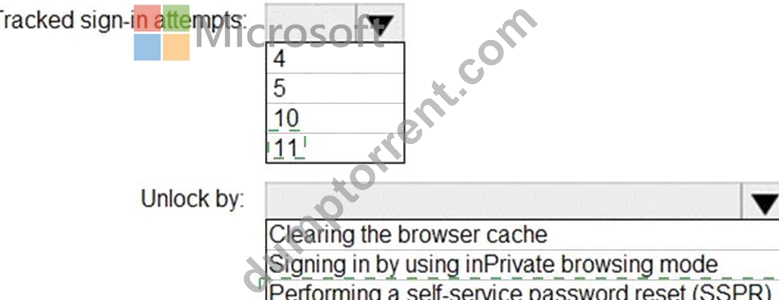
Explanation: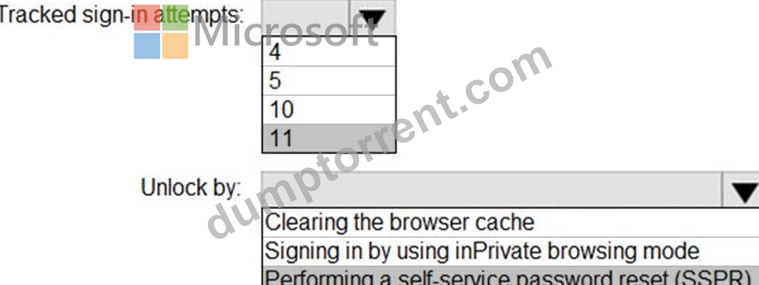
Reference:
https://docs.microsoft.com/en-us/azure/active-directory/authentication/howto-sspr-deployment
NEW QUESTION # 216
You have an Azure subscription.
Azure AD logs are sent to a Log Analytics workspace.
You need to query the logs and graphically display the number of sign-ins per user.
How should you complete the query? To answer, select the appropriate options in the answer area.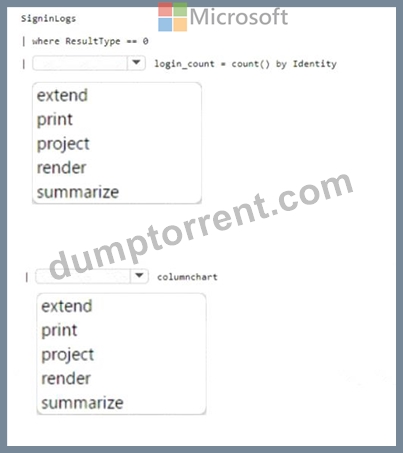
Answer:
Explanation: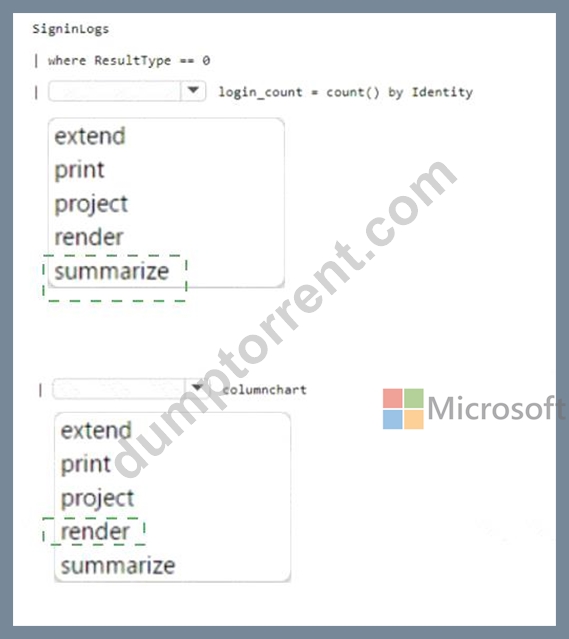
Explanation:
Box 1 =
SigninLogs
| where ResultType == 0
| summarize login_count = count() by identity
| render piechart
This query retrieves the sign-in logs, filters the successful sign-ins, summarizes the count of sign-ins per user, and renders the result as a pie chart.
Box 2 = Render
NEW QUESTION # 217
You have an Azure subscription named Sub1 that uses Microsoft Entra Permissions Management. Sub1 contains a user named User1. User1 is granted multiple permissions across Sub1.
You need to replace all the permissions granted to User1 with read-only permissions. The solution must minimize administrative effort.
What should you do on the Remediation tab in Permissions Management?
- A. From the Permissions subtab, use a quick action.
- B. From the Role/Policy Template subtab. create a template.
- C. From the Roles/Policies subtab. create a role.
- D. From the My Requests subtab, create a new request.
Answer: C
NEW QUESTION # 218
You have an Azure Active Directory (Azure AD) tenant that has Security defaults disabled.
You are creating a conditional access policy as shown in the following exhibit.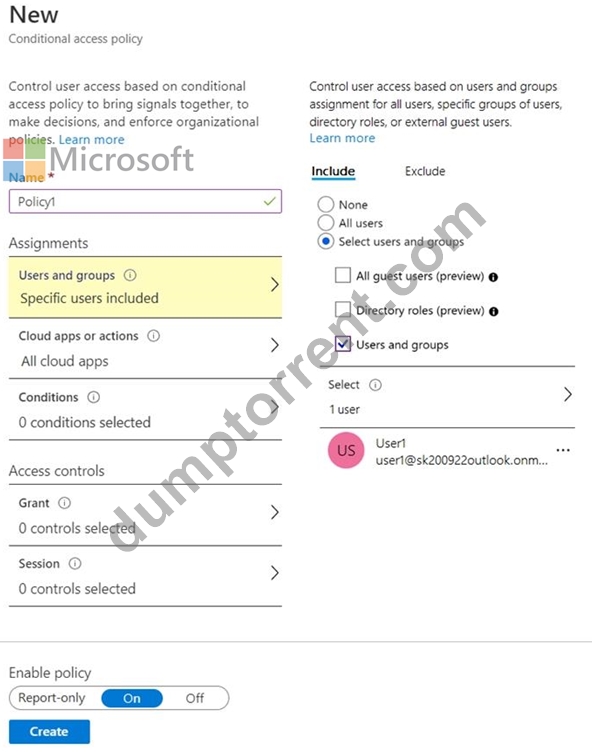
Use the drop-down menus to select the answer choice that completes each statement based on the information presented in the graphic.
NOTE: Each correct selection is worth one point.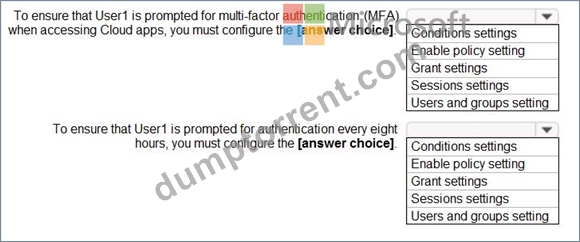
Answer:
Explanation: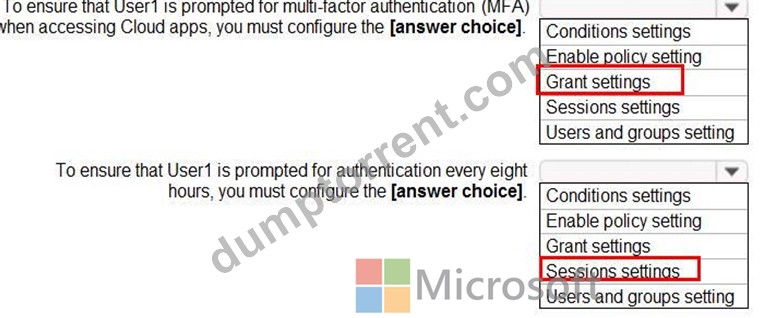
Reference:
https://docs.microsoft.com/en-us/azure/active-directory/conditional-access/howto-conditional-access-policy-all-users-mfa
NEW QUESTION # 219
You have a custom cloud app named App1 that is registered in Azure Active Directory (Azure AD).
App1 is configured as shown in the following exhibit.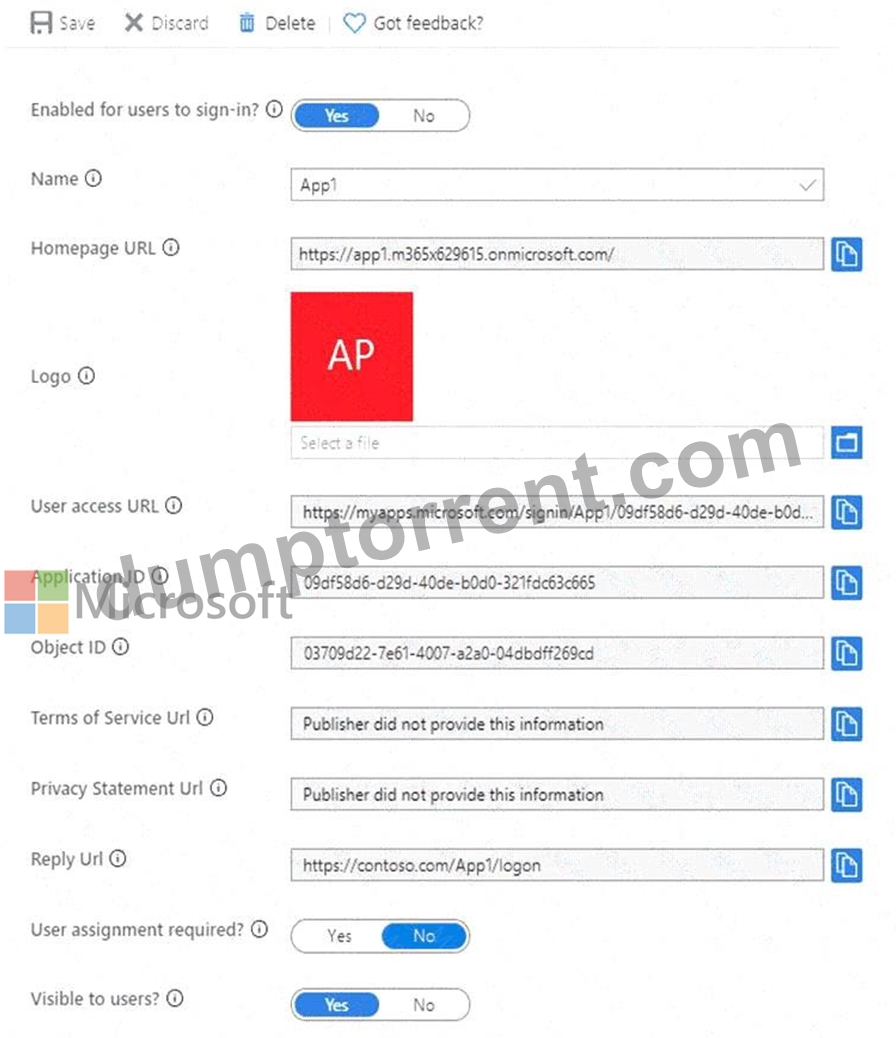
Use the drop-down menus to select the answer choice that completes each statement based on the information presented in the graphic.
NOTE:Each correct selection is worth one point.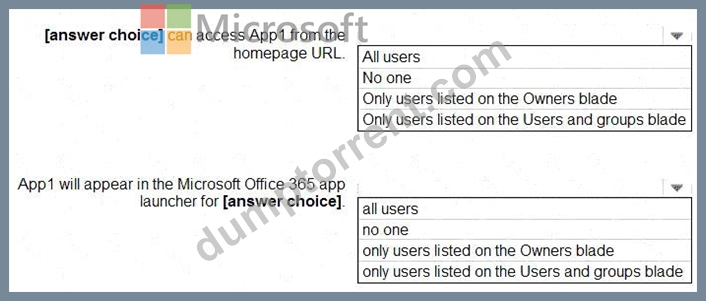
Answer:
Explanation: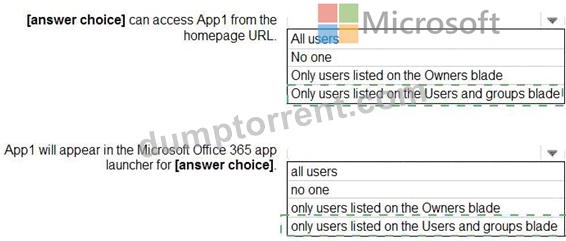
Explanation:
< [answer choice] can access App1 from the homepage URL: # Only users listed on the Users and groups blade App1 will appear in the Microsoft Office 365 app launcher for [answer choice]: # Only users listed on the Users and groups blade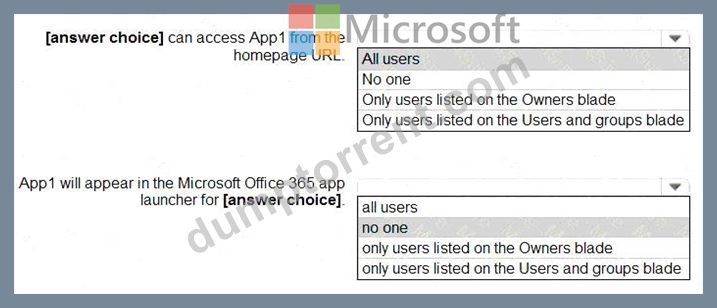
According to Microsoft's official documentation and the SC-300: Microsoft Identity and Access Administrator study guide, when you register and configure an enterprise application in Azure Active Directory, two specific settings directly influence user visibility and access:
* User assignment required?
* If this option is set to Yes, Azure AD requires users to be explicitly assigned to the app before they can sign in.
* Only users or groups listed on the Users and groups blade (app assignments) will have access.
* This means that even if the application is visible in Azure AD, users not assigned to it cannot authenticate or launch it.
* Visible to users?
* If set to Yes, the app appears in the Microsoft 365 app launcher (also known as the My Apps portal).
* However, when "User assignment required" is Yes, the visibility is limited only to those who are assigned to the app.
From the exhibit:
* "User assignment required?" = Yes
* "Visible to users?" = Yes
This configuration implies:
* Only assigned users (those listed on the Users and groups blade) can sign in to App1 via the homepage URL.
* App1 will appear in the Microsoft 365 app launcher (My Apps portal) only for those same assigned users.
As per Microsoft Learn documentation ("Manage enterprise apps in Azure AD"):
"When User assignment required is set to Yes, only users assigned to the application can access it. If Visible to users is also Yes, the application will appear in My Apps for those assigned users."
NEW QUESTION # 220
You have an Azure AD tenant named contoso.com that contains a group named All Company and has the following Identity Governance settings:
* Block external users from signing in to this directory: Yes
* Remove external user Yes
* Number of days before removing external user from this directory: 30
On March 1, 2022, you create an access package named Package1 that has the following settings:
* Resource roles
o Name: All Company
o Type: Group and Team
o Role: Member
* Lifecycle
o Access package assignment expire: On date
o Assignment expiration date: April 1, 2022
On March 1, 2022, you assign Package1 to the guest users shown in the following table.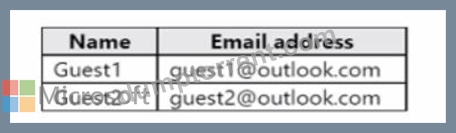
On March 2, 2022, you assign the Reports reader role to Guest1.
On April 1(2022, you invite a guest user named Guest3 to contoso.com.
On April 4, 2022, you add Guest3 to the All Company group.
For each of the following statements, select Yes if the statement is true. Otherwise, select No.
NOTE: Each correct selection is worth one point.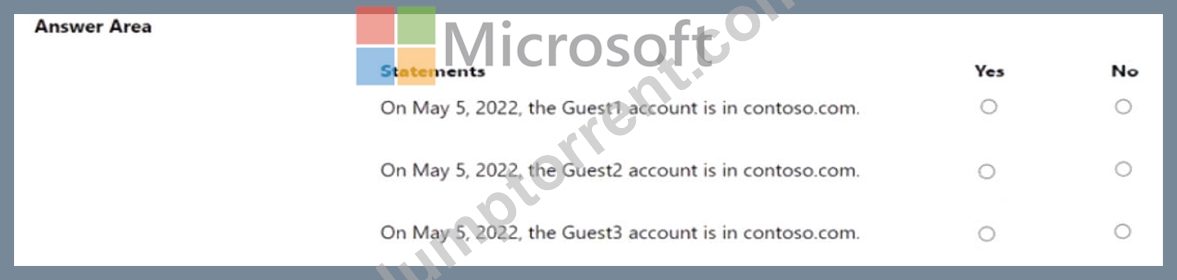
Answer:
Explanation: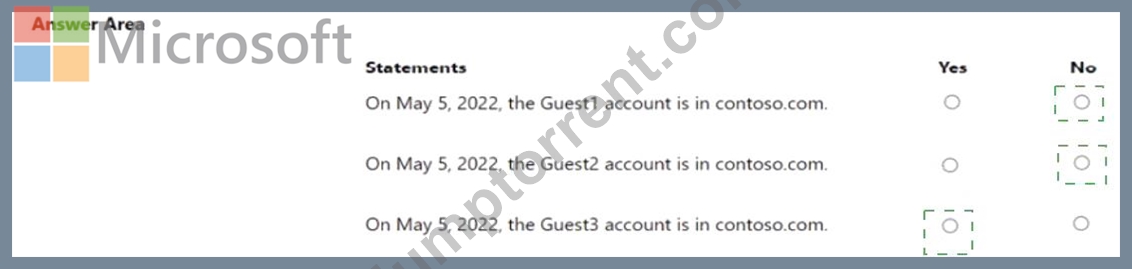
Explanation: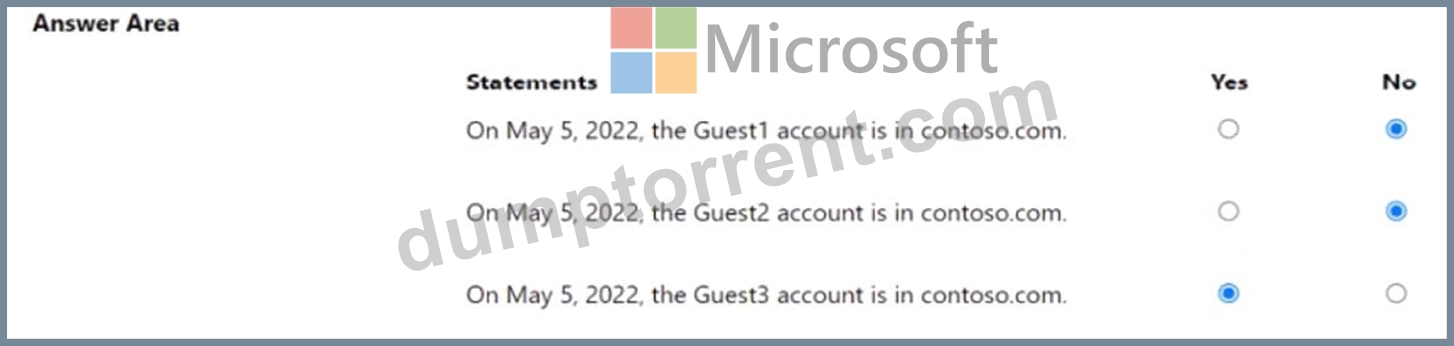
NEW QUESTION # 221
You have an Azure AD tenant and a .NET web app named App1.
You need to register App1 for Azure AD authentication.
What should you configure for App1?
- A. the bundle ID
- B. the executable name
- C. the package name
- D. the redirect URI
Answer: D
NEW QUESTION # 222
......
Latest Microsoft SC-300 Practice Test Questions: https://pass4sure.dumptorrent.com/SC-300-braindumps-torrent.html